CrossStitch 2.0: Dynamic Shader Linking in a Statically Linked World

In my last article, I described the first generation of CrossStitch, the shader assembly system used in MechAssault 2.  Today I’m going to write about the second generation of CrossStitch, the one used in Fracture.

Development on CrossStitch 2.0 began with the development of Day 1’s Despair Engine.  This was right at the end of MechAssault 2, when the Xbox 360 was still an Apple G5 and the Cell processor was going to be powering everything from super computers to kitchen appliances in a few years.  It is hard to believe looking back, but at that time we were still debating whether to adopt a high-level shading language for graphics.  There were respected voices on the platform side insisting that the performance advantage of writing shaders in assembly language would justify the additional effort.  Thankfully I sided with the HLSL proponents, but that left me with the difficult decision of what to do about CrossStitch.

CrossStitch was a relatively simple system targeting a single, very constrained platform.  HLSL introduced multiple target profiles, generic shader outputs, and literal constants, not to mention a significantly more complex and powerful language syntax.  Adding to that, Despair Engine was intended to be cross-platform, and we didn’t even have specs on some of the platforms we were promising to support.  Because of this, we considered the possibility of dispensing with dynamic shader linking entirely and adopting a conventional HLSL pipeline, implementing our broad feature set with a mixture of compile-time, static, and dynamic branching.  In the end, however, I had enjoyed so much success with the dynamic shader linking architecture of MechAssault 2, I couldn’t bear to accept either the performance cost of runtime branching or the clunky limitations of precomputing all possible shader permutations.

The decision was made: Despair Engine would feature CrossStitch 2.0.  I don’t recall how long it took me to write the first version of CrossStitch 2.0.  The early days of Despair development are a blur because we were supporting the completion of MechAssault 2 while bootstrapping an entirely new engine on a constantly shifting development platform and work was always proceeding on all fronts.  I know that by December of 2004, however, Despair Engine had a functional implementation of dynamic shader linking in HLSL.

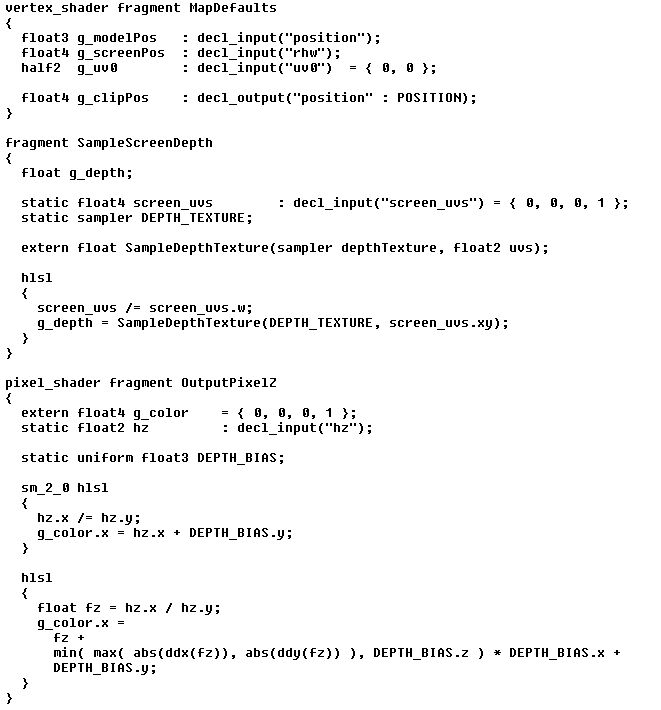
CrossStitch 2.0 is similar in design to its predecessor.  It features a front-end compiler that transforms shader fragments into an intermediate binary, and a back-end linker that transforms a chain of fragments into a full shader program.  The difference, of course, is that now the front-end compiler parses HLSL syntax and the back-end linker generates HLSL programs.  Since CrossStitch 1.0 was mostly limited to vertex shaders with fixed output registers, CrossStitch 2.0 introduced a more flexible model for passing data between pipeline stages.  Variables can define and be mapped to named input and output channels; and each shader chain requires an input signature from the stage preceding it and generates an output signature for the stage following it.

A sampling of early HLSL shader fragments.

CrossStitch’s primary concern is GPU runtime efficiency, so it is nice that shaders are compiled with full knowledge of the data they’ll be receiving either from vertex buffers or interpolators.  If, for example, some meshes include per-vertex color and some don’t, the same series of shader fragments will generate separate programs optimized for each case.  It turns out that this explicit binding of shader programs to attributes and interpolators is a common requirement of graphics hardware, and making the binding explicit in CrossStitch allows for some handy optimizations on fixed consoles.

The early results from CrossStitch 2.0 were extremely positive.  The HLSL syntax was a nice break from assembly, and the dynamic fragment system allowed me to quickly and easily experiment with a wide range of options as our rendering pipeline matured.  Just as had happened with MechAssault 2, the feature set of Despair expanded rapidly to become heavily reliant on the capabilities of CrossStitch.  The relationship proved circular too.  Just as CrossStitch facilitated a growth in Despair’s features, Despair’s features demanded a growth in CrossStitch’s capabilities.

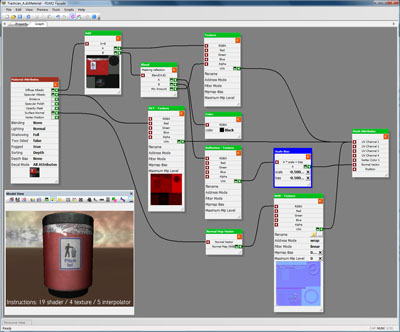
The biggest example of this is Despair’s material editor, Façade.  Façade is a graph-based editor that allows content creators to design extremely complex and flexible materials for every asset.  The materials are presented as a single pipeline flow, taking generic mesh input attributes and transforming them through a series of operations into a common set of material output attributes.  To implement Façade, I both harnessed and extended the power of CrossStitch.  Every core node in a Facade material graph is a shader fragment.  I added reflection support to the CrossStich compiler, so adding a new type of node to Façade is as simple as creating a new shader fragment and annotating its public-facing variables.  Since CrossStitch abstracts away many of the differences between pipeline stages, Façade material graphs don’t differentiate between per-vertex and per-pixel operations.  The flow of data between pipeline stages is managed automatically depending on the requirements of the graph.

Façade Material Editor

It was about 6 months after the introduction of Façade when the first cracks in CrossStitch began to appear.  The problem was shader compilation times.  On MechAssault 2 we measured shader compilation times in microseconds.  Loading a brand new level with no cached shader programs in MechAssault 2 might cause a half-second hitch as a hundred new shaders were compiled.  If a few new shaders were encountered during actual play, a couple of extra milliseconds in a frame didn’t impact the designers’ ability to evaluate their work.  Our initial HLSL shaders were probably a hundred times slower to compile than that on a high-end branch-friendly PC.  By the end of 2005 we had moved to proper Xbox 360 development kits and our artists had mastered designing complex effects in Façade.  Single shaders were now taking as long as several seconds to compile, and virtually every asset represented a half-dozen unique shaders.

The unexpected 4-5 decimal order of magnitude increase in shader compilation times proved disastrous.  CrossStitch was supposed to allow the gameplay programmers, artists, and designers to remain blissfully ignorant of how the graphics feature set was implemented.  Now, all of a sudden, everyone on the team was aware of the cost of shader compilation.  The pause for shader compilation was long enough that it could easily be mistaken for a crash, and, since it was done entirely on the fly, on-screen notification of the event couldn’t be given until after it was complete.  Attempts to make shader compilation asynchronous weren’t very successful because at best objects would pop in seconds after they were supposed to be visible and at worst a subset of the passes in a multipass process would be skipped resulting in unpredictable graphical artifacts.  Making matters worse, the long delays at level load were followed by massive hitches as new shaders were encountered during play.  It seemed like no matter how many times a designer played a level, new combinations of lighting and effects would be encountered and repeated second-long frame rate hitches would make evaluating the gameplay impossible.

Something had to be done and fast.

Simple optimization was never an option, because almost the entire cost of compilation was in the HLSL compiler itself.  Instead I focused my efforts on the CrossStitch shader cache.  The local cache was made smarter and more efficient, and extended so that multiple caches could be processed simultaneously.  That allowed the QA staff to start checking in their shader caches, which meant tested assets came bundled with all their requisite shaders.  Of course content creators frequently work with untested assets, so there was still a lot of unnecessary redundant shader compilation going on.

To further improve things we introduced a network shader cache.  Shaders were still compiled on-target, but when a missing shader was encountered it would be fetched from a network server before being compiled locally.  Clients updated servers with newly compiled shaders, and since Day 1 has multiple offices and supports distributed development, multiple servers had to be smart enough to act as proxies for one another.

With improvements to the shader cache, life with dynamic, on-the-fly shader compilation was tolerable but not great.  The caching system has only had a few bugs in its lifetime, but it is far more complicated than you might expect and only really understood by a couple of people.  Consequently, a sort of mythology has developed around the shader cache.  Just as programmers will suggest a full rebuild to one another as a possible solution to an inexplicable code bug, content creators and testers can be heard asking each other, “have you tried deleting your shader cache?”

At the same time as I was making improvements to the shader cache, I was also working towards the goal of having all shaders needed for an asset compiled at the time the asset was loaded.  I figured compiling shaders at load time would solve the in-game hitching problem and it also seemed like a necessary step towards my eventual goal of moving shader compilation offline.  Unfortunately, doing that without fundamentally changing the nature and usage of CrossStitch was equivalent to solving the halting problem.  CrossStitch exposes literally billions of possible shader programs to the content, taking advantage of the fact that only a small fraction of those will actually be used.  Which fraction, however, is determined by a mind-bending, platform-specific tangle of artist content, lua script, and C++ code.

I remember feeling pretty pleased with myself at the end of MechAssault 2 when I learned that Far Cry required a 430 megabyte shader cache compared to MA2’s svelte 500 kilobyte cache.  That satisfaction evaporated pretty quickly during the man-weeks I spent tracking down unpredicted shader combinations in Fracture.

Even so, by the time we entered full production on Fracture, shader compilation was about as good as it was ever going to get.  A nightly build process loaded every production level and generated a fresh cache.  The build process updated the network shader cache in addition to updating the shader cache distributed with resources, so the team had a nearly perfect cache to start each day with.

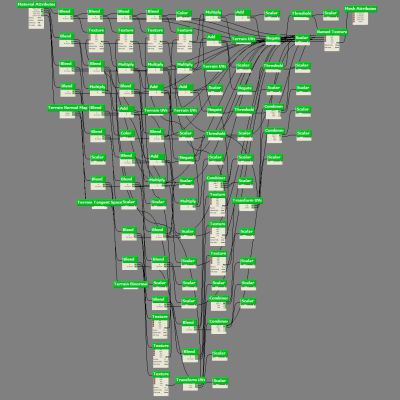
As if the time costs of shader compilation weren’t enough, CrossStitch suffered from an even worse problem on the Xbox 360.  Fracture’s terrain system implemented a splatting system that composited multiple Facade materials into a localized über material, and then decomposed the über material into multiple passes according the register, sampler, and instruction limits of the target profile.  The result was some truly insane shader programs.

The procedurally generated material for one pass of a terrain tile in Fracture.

A few Fracture terrain shaders took over 30 seconds to compile and consumed over 160 megabytes of memory in the process.  Since the Xbox 360 development kits have no spare memory, this posed a major problem.  There were times when the content creators would generate a shader that could not be compiled on target without running out of memory and crashing.  It has only happened three times in five years, but we’ve actually had to run the game in a special, minimal memory mode in order to free up enough memory to compile a necessary shader for a particularly complex piece of content.  Once the shader is present in the network cache, the offending content can be checked in and the rest of the team is none the wiser.

Such things are not unusual in game development, but it still kills me to be responsible for such a god-awful hack of a process.

And yet, CrossStitch continues to earn its keep.  Having our own compiler bridging the gap between our shader code and the platform compiler has proved to be a very powerful thing.  When we added support for the Playstation 3, Chris modified the CrossStitch back-end to compensate for little differences in the Cg compiler.  When I began to worry that some of our shaders were interpolator bound on the Xbox 360, the CrossStitch back-end was modified to perform automatic interpolator packing.  When I added support for Direct3D 10 and several texture formats went missing, CrossStitch allowed me to emulate the missing texture formats in late-bound fragments.  There doesn’t seem to be a problem CrossStitch can’t solve, except, of course, for the staggering inefficiency of its on-target, on-the-fly compilation.

For our next project I’m going to remove CrossStitch from Despair.  I’m going to do it with a scalpel if possible, but I’ll do it with a chainsaw if necessary.  I’m nervous about it, because despite my angst and my disillusionment with dynamic shader compilation, Day 1’s artists are almost universally fans of the Despair renderer.  They see Façade and the other elements of Despair graphics as a powerful and flexible package that lets them flex their artistic muscles.  I can’t take that away from them, but I also can’t bear to write another line of code to work around the costs of on-the-fly shader compilation.

It is clear to me now what I didn’t want to accept five years ago.  Everyone who has a say in it sees the evolution of GPU programs paralleling the evolution of CPU programs: code is static and data is dynamic.  CrossStitch has had a good run, but fighting the prevailing trends is never a happy enterprise.  Frameworks like DirectX Effects and CgFx have become far more full-featured and production-ready than I expected, and I’m reasonably confident I can find a way to map the majority of Despair’s graphics features onto them.  Whatever I come up with, it will draw a clear line between the engine and its shaders and ensure that shaders can be compiled wherever and whenever future platforms demand.

CrossStitch: A Configurable Pipeline for Programmable Shading

Some pieces of code are a source of great pride and some pieces of code are a source of terrible shame.  It is due to the nature of game development, I believe, that many of the most interesting pieces of code I write eventually become both.  That is certainly the case with the CrossStitch shader assembler, my first significant undertaking in the field of computer graphics.

CrossStitch has been the foundation of Day 1’s graphics libraries for over seven years now, and for almost half of that time it has been a regular source of frustration and embarrassment for me.  What I’d like to do is vent my frustration and write an article explaining all the ways in which I went wrong with CrossStitch and why, despite my hatred of it, I continue to put up with it.  But before I can do that I need to write this article, a remembrance of where CrossStitch came from and how I once loved it so much.

My first job in the game industry had me implementing the in-game UI for a flight simulator.  When that project was canceled, I switched to an adventure game, for which I handled tools and 3dsmax exporter work and later gameplay and graphical scripting language design.  A couple years later I found myself in charge of the networking code for an action multiplayer title, and shortly after that I inherited the AI and audio code.  Next I came back to scripting languages for a bit and worked with Lua integration, then I spent six months writing a physics engine before becoming the lead on the Xbox port of a PS2 title.  I only had a few people reporting to me as platform lead, so my responsibilities ended up being core systems, memory management, file systems, optimization, and pipeline tools.

When I interviewed at Day 1, one of the senior engineers asked me what I thought my greatest weakness was as a game developer and I answered honestly that although I’d worked in almost every area of game development, I’d had little or no exposure to graphics.  Imagine my surprise when less than a month after he hired me the studio director came to me and asked if I’d be willing to step into the role of graphics engineer.  It turned out that both of Day 1’s previous graphics engineers had left shortly before my arrival, and the company was without anyone to fill the role.  I was excited for the challenge and the opportunity to try something new, so I quickly accepted the position and went to work.

This left me in a very strange position, however.  I was inheriting the graphics code from MechAssault, so I had a fully working, shippable code base to cut my teeth on, but I was also inheriting a code base with no owner in a discipline for which I had little training, little experience, and no available mentor.  The title we were developing was MechAssault 2, and given that it was a second generation sequel to an unexpected hit, there was a lot of pressure to overhaul the code and attempt a major step forward in graphics quality.

The MechAssault 1 graphics engine was first generation Xbox exclusive, which meant fixed-function hardware vertex T&L and fixed-function fragment shading.  As I began to familiarize myself with the code base and the hardware capabilities, I realized that in order to implement the sort of features that I envisioned for MechAssault 2, I’d need to convert the engine over to programmable shading.  The Xbox had phenomenal vertex shading capability and extremely limited fragment shading capability, so I wanted to do a lot of work in the vertex shader and have the flexibility to pass data to the fragment shader in whatever clever arrangement would allow me to use just a couple instructions to apply whatever per-pixel transformations were necessary to get attractive results on screen.

The problem was that shaders are monolithic single-purpose programs and the entire feature set and design of the graphics engine were reliant on the dynamic, mix-and-match capabilities of the fixed-function architecture.  This is where my lack of experience in graphics and my lack of familiarity with the engine became a problem, because although I was feeling held back by it, I didn’t feel comfortable cutting existing features or otherwise compromising the existing code.  I wanted the power of programmable shading, but I needed it in the form of a configurable, fixed-function-like pipeline that would be compatible with the architecture I had inherited.

I pondered this dilemma for a few days and eventually a plan for a new programmable shader pipeline started to emerge.  I asked the studio director if I could experiment with converting the graphics engine from fixed-function to programmable shaders, and he found two weeks in the schedule for me to try.  Our agreement was that in order to claim success at the end of two weeks, I had to have our existing feature set working in programmable shaders and I had to be able to show no decrease in memory or performance.

My plan was to write a compiler and linker for a new type of shader program, called shader fragments.  Instead of an object in the game having to specify its entire shader program in a single step, the code path that led to rendering an object would be able to add any number of shader fragments to a list, called a shader chain, and finally the chain would be linked together into a full shader program in time for the object to draw.

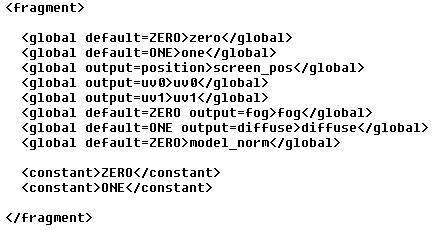
My first task was to define the syntax for shader fragments.  I had very limited time so I started with an easily parsable syntax, XML.  Fragments consisted of any number of named variables, any number of constant parameters, and a single block of shader assembly code.  Named variables were either local or global in scope, and they could specify several options such as default initialization, input source (for reading data from vertex attributes), output name (for passing data to fragment shaders), and read-only or write-only flags.

I wrote a simple C preprocessor, an XML parser, and a compiler to transform my fragments into byte-code.  Compiled fragments were linked directly into the executable along with a header file defining the constant parameter names.  Rendering of every object began with clearing the current shader chain and adding a fragment that defined some common global variables with default values.  For example, diffuse was a global, one-initialized variable available to every shader chain and screen_pos was a global variable mapped to the vertex shader position output.  Once the default variables were defined, a mesh might add a new fragment that defined a global variable, vertex_diffuse, with initialization from a vertex attribute and additional global variables for world-space position and normals.  Depending on the type of mesh, world-space position might be a rigid transformation of the vertex position, a single or multi-bone skinned transformation of the vertex position, or a procedurally generated position from a height field or particle system.

Common variables were defined for all shader chains.

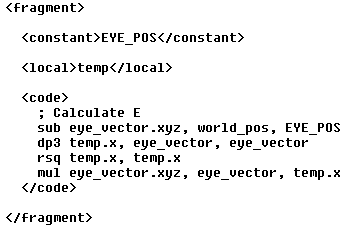
A shader fragment for generating the eye vector.

With world-space position and normals defined, other systems could then add fragments to accumulate per-vertex lighting into the global diffuse variable and to modulate diffuse by material_diffuse or vertex_diffuse.  Systems could also continue to define new variables and outputs, for example per-vertex fog or, in the case of per-pixel lighting, tangent space.  Precedence rules also allowed fragments to remap the inputs or outputs or change the default initialization of variables defined in earlier fragments.

Custom height fog was implemented in shader fragments.

Particles were generated in shader fragments.

The final step in rendering an object was to transform the active shader chain into a shader program.  Shader programs were compiled on the fly whenever a new shader chain was encountered, resulting in a small but noticeable frame rate hitch.  Luckily, the shader programs were cached to disk between runs so the impact of new shader compilations was minimal.  I had promised to add no additional CPU or GPU cost to rendering, so I put a lot of care into the code for adding shader fragments to shader chains and for looking up the corresponding shader programs.

It was a nerve-racking few weeks for me, however, because it wasn’t until I’d implemented the entire system and replaced every fixed-function feature supported by the engine with equivalent shader fragments that I was able to do side-by-side performance comparisons.  Amazingly, the CPU costs ended up being nearly indistinguishable.  Setting state through the fixed-function calls or setting shader constants and shader fragments was so close in performance that victory by even a narrow margin couldn’t be determined.

The results on the GPU were equally interesting.  The vertex shader implementation outperformed the fixed-function equivalent for everything except lighting.  Simple materials with little or no lighting averaged 10 – 20% faster in vertex shader form.  As the number of lights affecting a material increased, however, the margin dropped until the fixed-function implementation took the lead.  Our most complex lighting arrangement, a material with ambient, directional, and 3 point lights, was 25% slower on the GPU when implemented in a vertex shader.  With the mix of materials in our MechAssault levels, the amortized results ended up being about a 5% drop in vertex throughput.  This wasn’t a big concern for me, however, because we weren’t even close to being vertex bound on the Xbox, and there were several changes I wanted to make to the lighting model that weren’t possible in fixed-function but would shave a few instructions off the light shaders.

The studio director was pleased with the results, so I checked in my code and overnight the game went from purely fixed-function graphics to purely programmable shaders.  The shader fragment system, which I named CrossStitch, opened up the engine to a huge variety of GPU-based effects, and the feature set of the engine grew rapidly to become completely dependent on shader fragments.  By the time we shipped MechAssault 2, our rendering was composed of over 100 unique shader fragments.  These fragments represented billions of possible shader program permutations, though thankfully only a little more than 500 were present in our final content.

Here are some examples of features in MechAssault 2 that were made possible by shader fragments:

  • a new particle effects system which offloaded some of the simulation costs to the GPU
  • procedural vertex animation for waving flags and twisting foliage
  • a space-warp effect attached to certain explosions and projectiles that deformed the geometry of nearby objects
  • mesh bloating and stretching modifiers for overlay shields and motion blur effects
  • GPU-based shadow volume extrusion
  • per-vertex and per-pixel lighting with numerous light types and variable numbers of lights
  • GPU-based procedural UV generation for projected textures, gobo lights, and decals
  • content-dependent mesh compression with GPU-based decompression

A mech explosion deforms the nearby objects.

A mech explosion deforms nearby objects.

MA2 mixed per-vertex and per-pixel lighting.

By the end of MechAssault 2 I was convinced CrossStitch was the only way to program graphics.  I absolutely loved the dynamic shader assembly model I’d implemented, and I never had a second’s regret over it.  It was fast, memory efficient, and allowed me to think about graphics in the way I found most natural, as a powerful configurable pipeline of discreet transformations.  If only the story could end there.

In the future I’ll have to write a follow up to this article describing how CrossStitch evolved after MechAssault 2.  I’ll have to explain how it grew in sophistication and capability to keep pace with the advances in 3-D hardware, to support high-level language syntax and to abstract away the increasing number of programmable hardware stages.  I’ll have to explain why the path it followed seemed like such a good one, offering the seduction of fabulous visuals at minimal runtime cost.  But most importantly, I’ll have to explain how far along that path I was before I realized it was headed in a direction I didn’t want to be going, a direction completely divergent with the rest of the industry.

Cascaded Perspective Variance Shadow Mapping

Perhaps the most frustrating thing about shipping anything less than a blockbuster game is the lack of feedback you get on your work. The very best games of any given year will be scrutinized and evaluated by the community of developers, but everything else is pretty much ignored.  I was surprised and pleased therefore, when a friend pointed me to an old blog entry by Brian Karis that mentioned the shadows in Fracture.  Brian’s entry is only the fourth piece of feedback I’ve received on the technology behind Fracture, and it is the third piece specifically complimenting the shadows.  I’m particularly pleased to see praise for Fracture’s shadows, because finding just the right technique for them was a long and difficult process.

The first implementation of global shadows in Fracture was a single, orthographic shadow map fit to the view frustum. This was never intended to be the final solution, but it was quick and easy to implement and it provided a good baseline for measuring the value of other techniques.

Fracture was, at that time, spec’d to have draw distances of about a thousand meters, and we’d only budgeted enough memory and fill rate for a single 1024×1024 shadow map. Fracture was also first person initially, and we wanted convincing self-shadowing on the player’s 3-D hands and weapons. To get the kind of shadow resolution we wanted, we’d have needed a 100k by 100k orthographic shadow map or a 10,000 times increase in our shadow budget.

The perspective shadow map at its best.

After the orthographic shadow map, I implemented a form of perspective shadow mapping. Perspective shadow maps distribute resolution non-uniformly across the view frustum by utilizing a perspective projection to warp the shape of the shadow frustum to better fit the view frustum. My implementation of perspective shadow maps was primarily inspired by light-space perspective shadow maps. On the whole I found the perspective shadow map implementation reasonably straightforward, perfectly stable, and very effective at increasing shadow resolution near the player’s camera. With a single 1024×1024 perspective shadow map, the shadows in the immediate vicinity of the player were, in ideal conditions, high enough resolution to provide tolerable coarse shadows on the player’s weapon.

Unfortunately, not all conditions were ideal and there were problems.

Single-pass perspective shadow maps have limited flexibility in how they can redistribute resolution across the view frustum. When the shadow’s light direction is orthogonal to the view direction, the perspective shadow frustum is an almost perfect fit for the view frustum. However, as the shadow direction becomes more aligned with the view direction, perspective shadow maps lose their effectiveness and end up distributing shadow resolution uniformly, just like orthographic shadow maps. Luckily this isn’t as big a problem as it first sounds.

A barely discernable player shadow at a problematic view angle.

When the player camera is looking directly into the light, there aren’t really any visible shadow boundaries. Every visible surface is completely self shadowed, and that effect is handled redundantly by shading and shadowing. When the player is looking directly away from the light, however, he’s generally looking directly at his own shadow and shadow resolution is very important. Luckily there are two common characteristics of game worlds that held true for the prototype levels of Fracture. First, global shadows usually come from above, and second, the player camera is usually situated near the bottom of the world. Given these two constraints, there was an obvious solution to the problem of poor shadow resolution when looking at the player’s feet. Before fitting the shadow frustum to the view frustum, I first clipped the view frustum to the dynamic bounds of the world. When the camera is aligned with the light direction, the shadow frustum dimensions are constrained by the size of the visible camera’s far plane. With the view frustum starting at the player’s head and clipped by the ground just below his feet, the far plane of the view frustum was never more than fifty square meters and even a uniform distribution of resolution was sufficient to provide high quality shadows.

Despite its problems, the single perspective shadow map implementation persisted in Fracture for over a year of development. Unfortunately for me, during that time shadows in competing games continued to improve, and the artists and designers felt more and more constrained by the limitations of perspective shadow maps. The artists wanted to feature dramatic early morning and late afternoon lighting in levels, and the designers wanted to incorporate more vertical gameplay in which the player rained death from above down on enemies fifty meters below. We also had occasional issues in which an errant particle effect or physics object would penetrate the terrain and begin plummeting into the uncharted abyss below, dragging the world bounds and shadow quality along with it. In all of those cases my perspective shadow map implementation was no better than an orthographic shadow map and the shadows deteriorated to little more than dark smudges under large objects.

Player shadows were much improved with cascaded PSMs

To address the complaints about the single perspective shadow map approach, my coworker Kyle extended the system to use a cascade of three perspective shadow maps. The cascades were constructed so that each map covered a parallel slice of the view frustum, and the depth of each slice was hand-tuned to optimal effect. The first cascade covered only 4 meters, the next one 100 meters, and the final one fit the entire remaining portion of the view frustum which was still over a thousand meters. Each of the three maps was the same dimensions as the original shadow map, so memory and rendering costs tripled. However, the results were inarguably worth it. In all the cases where the quality of the single perspective shadow map suffered, the cascaded approach maintained high-resolution shadows in the immediate vicinity of the player. Shadows in the mid-distance (the second cascade) also received a moderate bump in resolution compared to the single map approach. Unfortunately shadows in the last cascade weren’t noticeably improved. The costs of this system were quite high, but nevertheless the artists and designers were appeased and development rolled on for another six months.

From the wrong camera angle, the sharp drop in cascade resolution decapitated the player shadow.

After six months with cascaded perspective shadow maps, the development team once again began to have second thoughts. The biggest complaint about the cascaded solution was the boundary between cascades. In problem areas the drop in resolution between the first and second cascades was dramatic. If the player managed to position himself so that the cascade boundary lay across his own shadow, the effect was really unsightly. In some cases the drop in resolution between the shadow of the player’s body and the shadow of the player’s head was so great that the player looked decapitated in his shadow.

From my perspective, there were three additional issues with our shadows. With the expansion to three cascaded shadow maps, shadows were now fantastically over budget. Also, in the middle and far distance where shadow resolution still struggled, the constant shimmering and crawling of the shadows as the camera moved really bothered me. Lastly, the irregularly shaped shadow frustum from the perspective shadow maps made it impossible to get good results from a constant shadow bias. Again in areas where shadow resolution struggled, the shadow bias was unpredictable resulting in inconsistent, but almost always excessive, “peter-panning.”

In the fall of 2007 I embarked on a final rewrite of global shadows for Fracture. To improve performance, I replaced the three independent shadow maps in the cascaded solution with three square regions allocated out of a single texture. I then replaced the shader code for sampling the three shadow maps with a new shader that calculated the UVs appropriate to the desired cascade and only performed a single (filtered) sample from the map. What I had learned from our experience with cascaded shadow maps was that fitting the view frustum with multiple shadow frusta is a far more effective way of increasing shadow map resolution than trying to warp a single shadow map.

Since the performance of my new shader scaled very gracefully with the number of shadow maps, I was able to simultaneously increase the effective shadow map resolution and decrease runtime performance and memory costs by increasing the number of cascades to five. The three 1024×1024 shadow maps were replaced with five 640×640 regions in a single map.

More cascades easily compensated for the switch to uniform shadow maps.

As the number of cascades increased, the value of the perspective transformation in the shadow frusta decreased. Meanwhile I was still frustrated with the shimmering and inconsistent shadow bias associated with perspective shadow maps. I finally made the difficult decision to abandon the perspective shadow map and use traditional orthographic projections for the cascades. This created a few new optimization opportunities in the shader, but more importantly it allowed me to make the shadows from static objects completely stable despite a moving camera and dynamic world bounds. I fit the orthographic shadow frusta to the cascading slices of the view frustum, but I required that the shadow frusta be world axis aligned and I quantized their positions so that as a shadow map moved through the world, its pixel centers always landed in the same place. I also had to quantize the shadow frusta’s near and far planes, though in a much coarser fashion, to ensure consistent depth for an object in the shadow map. This was necessary to guarantee 100% stability in the shadow map when using floating point depth formats.

An aligned cascade boundary, highlighted in red, cuts at odd angles across the view frustum.

Interestingly, clearing the shadows of shimmering and crawling created a new problem that I had to deal with. The uniform distribution of resolution within a cascade and the perfectly stable static shadows made the transitions between cascades really obvious. Whereas previously the general instability of the shadows helped hide the cascade boundaries sliding through the world, now there was a very clear resolution boundary. The fact that the cascades were aligned to the world axes and not the view direction contributed to this problem as well. I always sampled shadows from the highest resolution map available, which meant the cascade boundaries shifted depending on the orientation of the camera. When the camera was looking diagonally between two world axes, the cascade boundaries were at corners of the shadow maps rather than straight edges.

I was 50% over our original budget for shadows, but the new approach was half the cost of what we’d been living with for six months so I felt justified in sacrificing a bit more performance. I expanded each cascade slightly to create an overlap, and I extended the shader to blend between two cascades at the boundaries. On platforms with good pixel shader dynamic branching this only increased costs by about 15%. On less capable platforms the dynamic branching was omitted and the cost of applying shadows grew by 40% to twice our original budget. I also introduced a maximum range for the lowest resolution cascade at this point and faded shadows away completely beyond that distance. This fit conveniently within the blending code I’d already added to the shader, and it saved us from wasting shadow resolution on the rarely visible back half of a 1500 meter view frustum. As I recall, Fracture shipped with between a 250 and 350 meter shadow range depending on the level.

I also at this time pursued an avenue that turned out not to be fruitful. Much of the cost of applying the cascaded shadow maps came from the filtering I was doing in the shader. I was using an 8 tap, Poisson disk filter, which I felt was the best compromise between cost and quality. I decided to try out variance shadow maps instead. I have seen benefits from variance shadow maps in some situations, but in the case of global cascaded shadows the technique didn’t pan out. Variance shadow maps are more expensive to create because they generally can’t take advantage of depth-only rendering, and they either suffer from precision artifacts or they require more memory. They also incur a cost in prefiltering. All of these costs are expected to be made up for by significantly more efficient application of the shadow maps. In my case this simply wasn’t true. Even the best global shadow maps have pretty poor pixel coverage, so fully prefiltering the variance shadow maps is wasteful. I tried several approaches to optimize the variance shadow map technique, but in the end the performance was only equal to my non-variance implementation and the artifacts from the variance approach outweighed the improved softness of the shadows.

The last change I made for Fracture’s shadows was to replace the manually specified transition and cascade sizes with ones automatically computed to preserve constant screen-space shadow resolution between cascades. For any given scene I found that hand-tuned values could produce slightly more appealing results, but since we had many varying FOVs and shadow ranges, I didn’t feel justified in forcing the artists to manually specify every value.

One of the fun things about the work I put into the shadows in Fracture is that very few of the techniques I experimented with were mutually exclusive. I was able to, at one point, run through our levels toggling the shadows from perspective to orthographic, variance to non-variance, PCF to Poisson disk, and simultaneously varying the number, size, and resolution of the cascades. I also implemented debug visualization modes to show the outline of shadow texels in the world rather than the shadows themselves. Doing this, the value and cost of the various techniques became rapidly apparent. Perspective shadow maps were great, but I could always get better quality and lower costs by increasing the number of cascades. Prefiltering with variance shadow maps was great, but a fairly expensive filter during sampling was better looking for the same cost. The optimal number and size of cascades actually varied slightly depending on the target platform. Although I said we used five cascades at 640×640, that was only on the Xbox 360. On the PS3 the sweet spot for performance turned out to be distributing slightly more memory across three higher-resolution cascades.

The uniform shadow maps provided plenty of resolution even in worst-case scenarios.

That pretty much covers the implementation of global shadows that Fracture shipped with. It survived about two years with few complaints and reasonable performance. Since Fracture I’ve made a few more improvements, though mostly in the realm of optimizations. The most valuable optimization, and the only one I’ll mention here, was culling the contents of each cascade more aggressively. Although each cascade must be an orthogonal frustum from the perspective of the GPU, a much smaller volume can be defined on the CPU that covers all the shadow casters relevant to a particular map. The volume I use for culling each map is constructed by finding the intersection of the view frustum extruded in the direction of the light and the original orthogonal shadow frustum and then subtracting the volume of all the higher resolution maps. The result isn’t a convex shape, but it can be decomposed into an inclusive and an exclusive convex volume for fast object intersection queries.

In real-world data, more aggressive culling of the cascades reduced the number of objects rendered into the global shadow map by between 30 and 75 percent depending on the orientation of the camera relative to the light. The nice thing about this reduction is that it starts at the object level and consequently translates directly into CPU and GPU savings.

I’m pretty confident now that I won’t be revisiting global shadows again in this hardware generation.  I’m completely satisfied with both the cost and the quality of our current solution, and I don’t feel there is much improvement to be had without introducing a new computation model.  With any luck, the next time I’m thinking about global shadows it will be in the context of compute shaders and perhaps even non-rasterization based techniques.

Symbol Sort : A Utility for Measuring C++ Code Bloat

OVERVIEW

SymbolSort is a utility for analyzing code bloat in C++ applications.  It works by extracting the symbols from a dump generated by the Microsoft DumpBin utility or by reading a PDB file.  It processes the symbols it extracts and generates lists sorted by a number of different criteria.  You can read more about the motivation behind SymbolSort here.

The lists compiled by SymbolSort are:

Raw Symbols, sorted by size

This list is generated from the complete set of symbols.  No deduplication is performed so this list is intended to highlight individual large symbols.

File contributions, sorted by size

This list is generated by calculating the total size of symbols that contribute to a folder path.  If the input is a COMDAT dump, the source location for symbols is the .obj or .lib file that DumpBin was run on (see usage for details).  It is important to note that for COMDAT dumps individual symbols will appear multiple times coming from different .obj files.  If the input is a PDB file, the source location for symbols is the actual source file in which the symbol is defined.  The source file for data symbols is not always clearly defined within the PDB so in some cases it is a best guess.

File contribution, sorted by path

This is a complete, hierarchical list of the size of symbols in all contributing source files.

Symbol Sections / Types, sorted by total size and by total count

This shows a breakdown of symbols by section or type, depending on the kind of information that can be extracted from the input source.

Merged Duplicate Symbols, sorted by total size and by total count

This list is generated by merging symbols with identical names.  The symbols are not guaranteed to be the same symbol.  In the case of PDB input there will be very few duplicate symbols.  COMDAT input, however, should contain a large number of duplicate symbols.  This list is useful for measuring total compile and link time for a particular symbol.  A relatively small symbol that appears in a very large number of .obj files will have a large total size and appear near the top of this list.

Merged Template Symbols, sorted by total size and by total count

This list is generated by stripping template parameters from symbols and then merging duplicates.  Symbols std::auto_ptr<int> and std::auto_ptr<float> will be transformed into std::auto_ptr<T> in this list and be counted together.

Merged Overloaded Symbols, sorted by total size and by total count

This list is generated by stripping template parameters and function parameters from symbols and then merging duplicates.  Overloaded functions sqrt(float) and sqrt(double) will be transformed into sqrt(…) in this list and be counted together.

Symbol Tags, sorted by total size and by total count

This list represents a tag cloud generated from the symbol names.  The symbols are tokenized and the total size and count is tallied for each token.  I’m not sure what this list is good for, but I’m all about tag clouds so I couldn’t resist including it.

USAGE

SymbolSort [options]

Options:
  -in[:type] filename
      Specify an input file with optional type.  Exe and PDB files are
      identified automatically by extension.  Otherwise type may be:
          comdat - the format produced by DumpBin /headers
          sysv   - the format produced by nm --format=sysv
          bsd    - the format produced by nm --format=bsd --print-size

  -out filename
      Write output to specified file instead of stdout

  -count num_symbols
      Limit the number of symbols displayed to num_symbols

  -exclude substring
      Exclude symbols that contain the specified substring

  -diff:[type] filename
      Use this file as a basis for generating a differences report.
      See -in option for valid types.

  -searchpath path
      Specify the symbol search path when loading an exe

SymbolSort supports three types of input files:

COMDAT dump

A COMDAT dump is generated using the DumpBin utility with the /headers option.  DumpBin is included with the Microsoft compiler toolchain. SymbolSort can accept the dump from a single .lib or .obj file, but the best way to use it is to create a complete dump of all the .obj files from an entire application.  The Windows command line utility FOR can be used for this:

for /R "c:\obj_file_location" %n in (*.obj) do "C:\Program Files (x86)\Microsoft Visual Studio 9.0\VC\bin\DumpBin.exe" /headers "%n" >> c:\comdat_dump.txt

This will generate a concatenated dump of all the headers in all the .obj files in c:\obj_file_location.  Beware, for large applications this could produce a multi-gigabyte file.

PDB or EXE

SymbolSort supports reading debug symbol information from .exe files and .pdb files.  The .exe file will only be used to find the location of its matching .pdb file, and then the symbols will be extracted from the PDB.  SymbolSort uses msdia90.dll to extract data from the PDB file.  Msdia90.dll is included with the Microsoft compiler toolchain.  In order to use it you will probably have to register the dll.

regsvr32 "C:\Program Files\Common Files\Microsoft Shared\VC\msdia90.dll"

It is important that you register the 64-bit version of msdia90.dll on 64-bit Windows and the 32-bit version on 32-bit Windows.  If you don’t find msdia90.dll in the path listed above, try looking for it in the Visual Studio install directory under “\Microsoft Visual Studio 9.0\DIA SDK\bin\”

NM dump

Similar to the COMDAT dump, SymbolSort can accept symbol dumps from the unix utility nm.  The symbols can be extracted from .obj files or entire .elfs.  SymbolSort supports bsd and sysv format dumps.  Sysv is preferred because it contains more information.  The recommended nm command lines are:

nm --format=sysv --demangle --line-numbers input_file.elf
nm --format=bsd --demangle --line-numbers --print-size input_file.elf

DOWNLOAD

SymbolSort-1.1.zip

BUILDING

The source for SymbolSort is distributed as a single file, SymbolSort.cs.  It can be built as a simple C# command line utility.  In order to get the msdia90 interop to work you must add msdia90.dll as a reference to the C# project.  That is done either by dragging and dropping the dll onto the references folder in the C# project or by right clicking the references folder, selecting “Add Reference” and then browsing for the msdia90 dll.

REVISION HISTORY

    1.1    Added support for computing differences between multiple input sources
           Added support for nm output for PS3 / unix platforms
           Changed command line parameters.  See usage for details.
           Added section / type information to output.
    1.0    First release!

FUTURE WORK (to be done by someone else!)

  • Add a GUI frontend to allow interactive filtering and sorting.
  • Read both the PDB and the COMDAT dump simultaneously and cross-reference the two.  This would enable new kinds of analysis and richer dumps.
  • Produce additional merged symbol reports by merging all symbols from the same class or namespace or that match based on some more clever fuzzy comparison.
  • Improve relative -> absolute path conversion for nm inputs
  • Figure out how to extract string literal information from PDB.

Minimizing Code Bloat: Redundant Template Instantiation

This article is a continuation of Minimizing Code Bloat for Faster Builds and Smaller Executables.

The last item on my list of code bloat causes is redundant template instantiation.  Template functions have a lot in common with inline functions.  Like inline functions, template functions are instantiated into the object file of every translation unit in which they are used.  Also like inline functions, template functions generate weak symbols which are merged silently by the linker.  Redundant template instantiations won’t increase your executable size, but they can contribute significantly to your build times.

Consider a commonly used class like std::string.  The std::string class is actually a template class defined as:

typedef basic_string<char, char_traits<char>, allocator<char> > string;

In an engine that uses std::strings, some members like std::string::assign may be referenced in nearly every translation unit.  Even engines that eschew the use of std::string may unknowingly be instantiating a lot of std::string code because it is so pervasive in the standard library.  Looking at a symbol dump from one version of Despair Engine, I see over 1600 instances of dozens of functions from std::string.  That’s right, in every full build we compile most of std::string 1600 times, optimize the code 1600 times, write it into .obj files 1600 times, copy it into .lib files 1600 times, read it into the linker 1600 times, and then throw 1599 identical copies away!  All told I think it is less than 10 megabytes of code and accounts for only a couple percent of our build times, but still, it’s a lot to pay for a wrapper around a char*.

Don’t think that these sorts of problems are confined to the standard library.  Any template class that is widely used can produce a lot of code bloat from redundant instantiations.  The question is, what do you do about it?

One option is to convert template code into non template code.  If you never instantiate basic_string with anything other than a single set of parameters, is it really worth being a template class?  The same question could be asked of a templatized math library.  Does matrix<T> need to be a template class when all you ever use is matrix<float>?

Although removing template code is always an option, it isn’t always a good one.  Template code may be expensive, but it is also really handy.  If you have a templatized math library, chances are that while 99% of the instantiations are matrix<float>, somewhere in your engine or tools you have an instantiation of matrix<double>.  Similarly, amid all those instantiations of basic_string<char>, maybe there’s a basic_string<wchar_t> or two hanging out.

Luckily there is a way to prevent redundant template instantiations without changing the code.  That is through the use of explicit template instantiation declarations.  Explicit instantiation declarations aren’t technically part of the C++ standard, but they’re supported by MSVC and gcc and they’re included in the C++09 draft standard, so they’re a safe bet to use.  What explicit instantiation declarations do is allow you to prevent the compiler from instantiating a particular template in the current translation unit.  They look just like explicit instantiation definitions, but they’re preceded by the extern keyword.  For example, the explicit instantiation declaration of basic_string<char> looks like this:

extern template class basic_string<char>;

You can add this declaration to a root header in your application and rebuild, and, unless you’ve missed a translation unit, you’ll encounter linker errors for missing basic_string<char> symbols.  Once you’ve removed all the basic_string<char> instantiations from your engine, the next thing to do is to add one back so the linker has all the code it needs to put together a complete executable.  That’s where explicit instantiation definitions come in.

Explicit instantiation definitions are the counterpart to explicit instantiation declarations.  They tell the compiler to fully instantiate a particular template even if it is otherwise unused in the current translation unit.  Here’s an example of how you can use the two concepts together to prevent redundant instantiations of basic_string.

// in string_instantiation.h
#ifdef DS_EXTERN_TEMPLATE_INSTANTIATION
namespace std
{
    extern template class basic_string<char>;
}
#endif

// in string_instantiation.cpp
#ifdef DS_EXTERN_TEMPLATE_INSTANTIATION
#undef DS_EXTERN_TEMPLATE_INSTANTIATION

#include "string_instantiation.h"

namespace std
{
    template class basic_string<char>
}
#endif // DS_EXTERN_TEMPLATE_INSTANTIATION

The DS_EXTERN_TEMPLATE_INSTANTIATION #define in the above code serves two purposes.  First it allows us to disable explicit template instantiation for compilers that don’t support it, and second it allows us to work around a common bug in compilers that do support it.  Although the standard states that an explicit instantiation definition may follow an explicit instantiation declaration within a translation unit, many compilers don’t like it and won’t allow an explicit instantiation definition to override a preceding explicit instantiation declaration.

There is one dark fact about explicit template instantiation that you should know before applying it in your own codebase.  Although explicit template instantiation effectively turns template code into non template code from the perspective of code bloat, it doesn’t really help much with classes like std::string.  The syntax for out-of-line template class function definitions is so cumbersome that many programmers prefer to implement all their template class members entirely within the class declaration.  That’s what has happened with Microsoft’s STL implementation.  Unfortunately what that does is implicitly make every member function in a template class an inline function.  Of course most of the member functions are so large that they’ll never be inlined, but it doesn’t matter from the perspective of the compiler.

The explicit template declaration of basic_string<char> prevents the compiler from instantiating its members as template functions, but it doesn’t prevent it from instantiating them as inline functions!  The basic_string class goes from a classic example of code bloat due to redundant template instantiation to a classic example of code bloat due to incorrect inlining!  You can’t win!

In your own code, at least, you can fix the incorrect inlining problem right after you fix the redundant instantiation problem.  Just move the template class member functions out of line and they’ll disappear from your symbol dumps.

And that’s everything I know about code bloat in a voluminous 6 part series.  Perhaps what I should be writing about is blog bloat.  All that’s left is to post some code.